Bill payment kiosk software integration solves this by connecting self-service kiosks directly to billing, ERP, and financial systems, so payment data flows automatically instead of getting hand-entered twice. Manual reconciliation alone has caused real damage: a GAO review found the SEC failed to identify more than $1 million in outstanding travel obligations because of an error-prone manual spreadsheet process.
This guide covers the main integration types, how they affect kiosk performance, the security requirements you can't skip, and what to look for in an integration partner.
Key Takeaways
- Integration connects kiosk hardware to billing, tax, court, or utility systems for automatic data sync
- Choose among three methods: real-time, file-based (batch), or non-validated data exchange
- Properly integrated kiosks cut counter workload and extend payment access to 24/7
- PCI-DSS and EMV certification are baseline requirements for any payment kiosk deployment
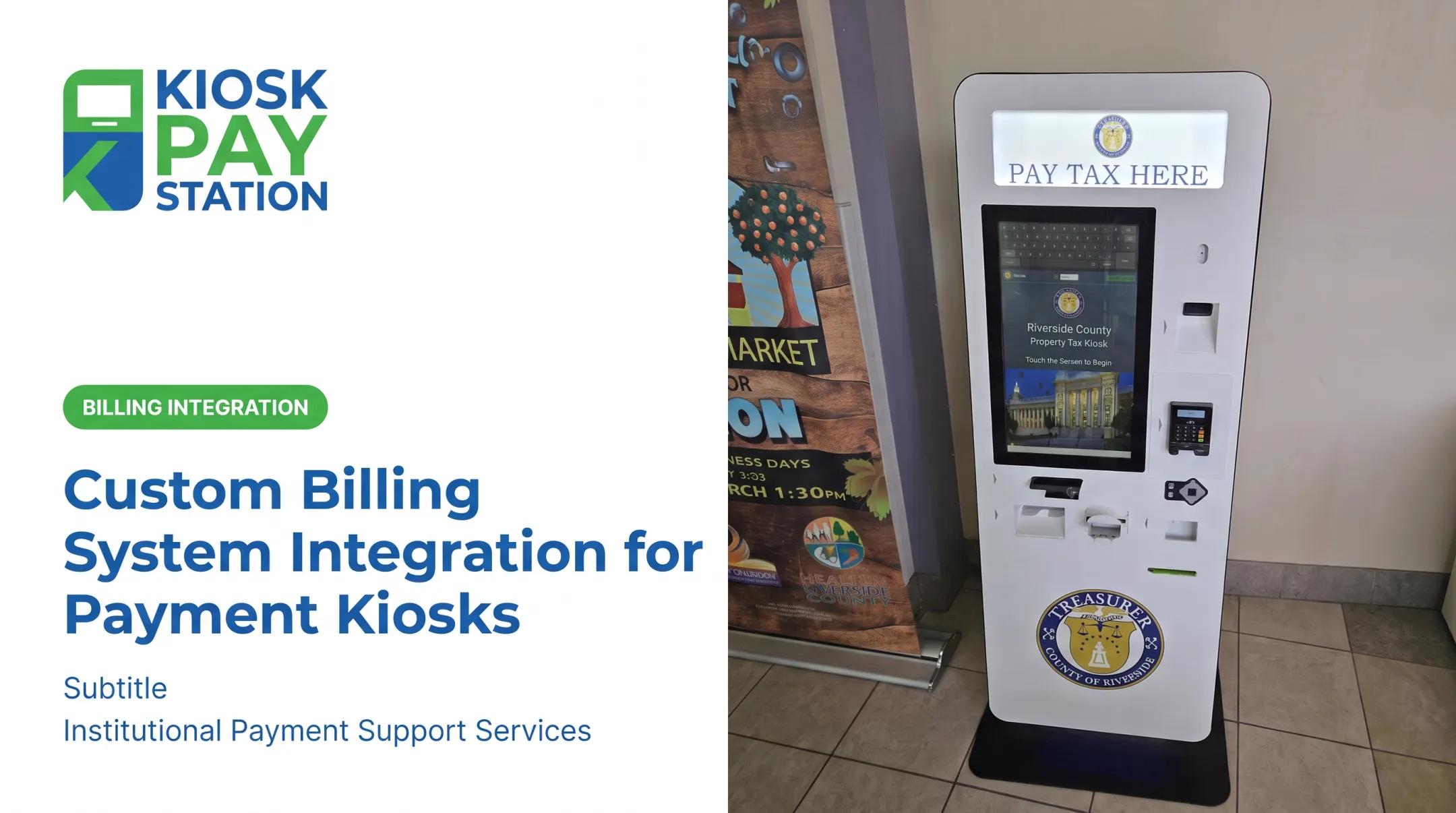
- Riverside County's two kiosks collected $3.01M in seven days, beating eight staffed cashier stations at $2.4M
What Is Bill Payment Kiosk Software Integration?
Bill payment kiosk software integration is a specialized form of enterprise application integration (EAI). It connects kiosk hardware and software to an agency's billing, tax, court, or utility platforms so payment data moves automatically instead of through manual entry.
Standalone kiosks collect payments but require staff to manually reconcile that data against the billing system later. Integrated kiosks eliminate that step entirely, posting payments and syncing records in real time or through scheduled batches.
Integration also changes how citizens interact with the kiosk. Instead of typing in an account number from memory, residents can pull up their account using:
- An invoice number
- A QR code scanned from a bill or notice
- A barcode printed on a payment notice
- A name or account number entered manually
- Custom identifiers unique to the agency's workflow
Agencies can also attach unlimited custom data elements to each transaction, such as department codes, account numbers, or property IDs, so every payment carries the exact metadata their back-office system needs.

Types of Software Integration Used in Bill Payment Kiosks
Not every agency has the same IT infrastructure. Most bill payment kiosk deployments use one of three primary integration methods—then add legacy connectors or enterprise middleware when the environment requires it.
Real-Time Integration
This is a live API or database connection that validates account balances and posts payments the instant a citizen completes a transaction. Clarksville, Tennessee's municipal utility, for example, posts kiosk payments to accounts immediately, with a confirmation receipt printed on the spot. No overnight lag, no manual entry the next morning.
File-Based (Batch) Integration
When real-time API access isn't available, agencies rely on scheduled file transfers instead. Buncombe County, North Carolina's tax billing system uses this approach: a full data file gets generated monthly, plus a nightly "delta" file of unpaid billing information sent to its payment vendor. It's slower than real-time, but it works with older systems that weren't built for live connections.
Non-Validated Integration
Sometimes called "blind" payments, this method captures payment data without checking it against a live account balance. A citizen enters a custom amount rather than the kiosk pulling a verified balance. It's simpler to deploy and works well for agencies with straightforward collection needs where live verification isn't essential.
Those three methods cover how payments are validated and posted. Two more factors shape how kiosks attach to the systems agencies already run.
Legacy System Integration
Older government mainframes and on-premises billing systems weren't designed with modern APIs in mind. Kiosks connect to these systems through API bridges or database connectors, the same incremental path used to modernize other legacy enterprise systems without a full rip-and-replace.
Enterprise Application Integration (EAI) for Kiosks
As an agency's self-service footprint grows across departments, EAI ties kiosk front-ends to ERP, courts management, or utility billing back-ends. IBM defines EAI as connecting disparate applications—often through APIs and middleware—to reduce data silos and simplify cross-system workflows.
For a tax office running kiosks alongside courts and utilities, that shared layer keeps three payment channels from turning into three separate reporting systems.

How Integration Methods Impact Kiosk Performance
The architecture behind your integration matters just as much as which method you pick.
Point-to-point vs. hub-and-spoke:
| Model | How it works | Best for |
|---|---|---|
| Point-to-point | Each kiosk connects directly to each back-office system | Small deployments, one or two systems |
| Hub-and-spoke | All kiosks connect to one central hub, which routes to multiple systems | Multi-department rollouts (tax, courts, utilities) |
Point-to-point connections multiply fast. Add a third department and you're suddenly managing several new direct connections instead of one. TechTarget notes that hub-and-spoke is generally more reliable and faster than point-to-point, though it takes more upfront work to implement.
A central data hub also lets agencies scale to new departments without rebuilding connections from scratch. Add a parking authority or courts department, and it plugs into the existing hub instead of a brand-new integration project.
That flexibility matters more than chasing a perfect architecture on day one. KIOSK PAY STATION's real-time, file-based, or non-validated integration options let agencies choose based on what their existing infrastructure can support, whether that's a full end-to-end deployment or layering onto systems already in place.
Key Benefits of Integrating Kiosk Software with Back-Office Systems
Integration changes day-to-day operations at the counter, not only the tech stack behind it.
- Front-desk workload: Account lookups and payment posting happen automatically, freeing staff for higher-value work
- Transaction accuracy: Records stay fully traceable and reconcilable without manual re-keying
- 24/7 payment access: Citizens pay on their schedule, not just during business hours
- Daily reconciliation: Export-ready transaction data fits directly into existing reconciliation workflows
Real-World Example: Riverside County
Numbers make the case better than any feature list. In Riverside County, two integrated kiosks collected $3.01 million in a seven-day period. During that same stretch, eight staffed cashier stations processed $2.4 million. Two kiosks handled over half of all payments collected—more volume than a cashier team four times their size.

Security and Compliance Considerations for Kiosk Integration
Payment data moving between a kiosk and a government back-office system is a prime target. Compliance is the foundation of the integration, not a final checkbox.
PCI DSS and EMV requirements:
- PCI DSS applies to any entity storing, processing, or transmitting cardholder data—including government kiosks that accept card payments
- PCI SSC's current standard, PCI DSS v4.0.1, became the only active version after v4.0 retired at the end of 2024
- EMV Level 1 and Level 2 testing verifies that acceptance devices meet chip-card performance and compatibility standards
Data transfer protections:
Encrypted processing and controlled access should sit between the kiosk and agency systems. KIOSK PAY STATION supports PCI DSS-compliant integrations with encrypted transaction processing across all three integration methods.
Accessibility requirements:
ADA standards require self-service payment machines to be usable without add-on assistive technology. That includes:
- Large touchscreens that meet reach and visibility requirements
- Voice and light instructions that guide users through each step
- Multilingual interfaces for diverse resident populations
Miss any of these and you create a compliance gap and a barrier for the citizens the kiosk is meant to serve.

Choosing the Right Integration Partner for Your Agency
Not every kiosk vendor treats integration the same way. Before signing anything, agencies should look for:
- Flexible integration options: real-time, file-based, and non-validated methods so you can match existing IT infrastructure instead of forcing a rebuild
- Proven public-sector experience: government billing systems have quirks generic retail kiosk vendors rarely understand
- Ongoing maintenance and support: onsite maintenance and component replacement, not just install-and-walk-away support
- Customizable data capture: unlimited custom fields (department codes, property IDs, account numbers) matter more once you scale past one department
- Deployment flexibility: standalone, countertop, and in-wall configurations should fit your space, not the other way around
A vendor that locks you into one rigid integration path will cost you more down the line than one that adapts to what you already have running.
Frequently Asked Questions
What is software integration for payment kiosks?
Software integration connects separate systems—like a kiosk and a billing database—so they share data automatically. It removes manual re-entry and keeps records synced across platforms.
What types of integration do bill payment kiosks use?
Payment kiosks typically use real-time (live posting), file-based (scheduled batch transfers), or legacy connections that bridge older mainframes. Larger agencies may also use enterprise application integration to link kiosks into agency-wide systems.
What is enterprise application integration?
EAI connects separate applications—often through APIs or middleware—to reduce data silos. For kiosks, that means tying the payment front end to back-office ERP, courts, or utility billing platforms.
What does kiosk software integration look like in practice?
Typical setups include account lookup by invoice number or QR code, nightly batch reconciliation feeds, and custom fields—such as department codes or property IDs—on each transaction.
Do agencies need a general integration platform?
General iPaaS and EAI tools can work for broad enterprise projects. For government billing, KIOSK PAY STATION provides pre-built integration methods aimed at agency and utility systems, so many clients do not need a separate platform layer.
Which enterprise systems do payment kiosks usually connect to?
Most government kiosks connect to ERP systems, CRM platforms, and billing or tax management systems used by utilities, courts, and municipal finance teams.